


12 WhatsApp Use Cases Every Hotel Could Be Running (With Real Message Examples)

Reputation Management
All Your Reviews In One Place
Track Reviews & Feedback, Collect More Reviews, Prevent Poor Reviews, Guest Feedback, Analytics & Reporting, Respond to Reviews with guestAI or with our Dedicated Team, Reviews Widget for Website, PMS Automations and more.
Book a Quick 15-minute Call for a Customized Setup. We personalize your trial by understanding your brand's unique goals during a quick call.
Guest Messaging Platform
Transform Guest Communication & Revenue with an All-in-One Platform
Seamless Guest Communication and Engagement: From Pre-arrival to Check-out
Book a Quick 15-minute Call for a Customized Setup. We personalize your trial by understanding your brand's unique goals during a quick call.
Review Responses
Done For You
Handcrafted, Personalized Responses to Your Online Reviews. Done for You.
Book a Quick 15-minute Call for a Customized Setup. We personalize your trial by understanding your brand's unique goals during a quick call.
Request Free Trial
Book a Quick 15-minute call
We personalize your trial by understanding your brand's unique goals during a quick call.
.jpg)
Give your guests a digital journey that feels like it was made just for them, while giving your team the power to multitask like pros, run leaner, and turn every message into great engagement, ROI, and smooth workflows.
As a verified brand, with onboarding handled by GuestTouch, you can create a remarkable, high-trust, guest journey on one of their most-used apps, not just booking confirmations, but every touchpoint from the moment someone books to long after they check out.
WhatsApp brings two advantages no other channel matches: engagement that dwarfs email, and the trust of a verified business profile sitting right in the guest's most-used app with two-way messaging capabilities with rich media.
Once you map the journey, the possibilities multiply.
Here are 12 touchpoints and examples to get you going.
Best Practices to Keep in Mind:
- Keep it high-value from the guest's POV. Your message should give guests something useful, not just push the property's agenda.
- Keep it holistic. Understand & Map YOUR Guest Journey. Design the journey as one connected thread, not a pile of one-off messages.
- Keep it short. No one wants to read a long message on WhatsApp. Get to the point fast.
- Pair it with a digital guidebook, dedicated URL, etc. Route detail-heavy info there so the total number of messages stays lean and optimized.
- Track staff performance alongside automation. When responses are automated accurately, it's easy to see which staff excel at handling guest requests versus where automation is carrying the load.
Built on WhatsApp's official Business API for hotels, GuesTouch Messaging Platform is purpose-built exclusively for hotels. Designed to deliver this journey securely and handle these hotel-specific benefits and use cases.
The Lens: GuestTouch's Adaptive Messaging Model For WhatsApp
Before the list, one framing point worth keeping in mind as you read: a good WhatsApp message isn't just about picking the right words. It's five decisions working together: GuestTouch calls this the Adaptive Messaging Model:
- Right Message: message unique to specific guests based on their profile. Enriched automatically. Ex: room type, preference, package they have booked etc.
- Right Guest: one guest, a segment of guests, or everyone currently in-house or coming in today.
- Right Time: triggered by a guest event (booked, checked in, in-house) or a scheduled message, or broadcast.
- Right Format: plain text, an image, or attachments.
- Right Channel: WhatsApp, SMS, or whichever channel the guest actually prefers
Every use case below is really just a different combination of those five dials. Once you see it that way, building your own 16th, 17th, and 18th use case gets a lot easier.
One more thing before the list: WhatsApp sorts every message you send into a category: Service, Utility, Marketing, or Authentication, and mixing them up (like adding a discount to what should be a plain checkout reminder) is the fastest way to get a template rejected.
We've tagged each use case below so you can easily see where it typically falls; if you want the full breakdown of what each category allows, our compliance guide covers it in depth. If you need any help, our onboarding will help you take care of all of this.
Pre-Arrival: Turn a Booking Into a Warm Welcome
The pre-arrival window is where WhatsApp already earns its keep for most hotels — but there's more available here than a single confirmation message.
1. The Instant Booking Confirmation
The obvious one, but worth doing well: a confirmation that lands within seconds of booking, not the next email-batch cycle. WhatsApp's open rate — typically in the 95–98% range within 24 hours — makes it far more likely a guest actually sees confirmation details than if they're buried in an inbox.
"Hello, you're all set, Maria! Penthouse for Jun 14–17. Reply here anytime before you arrive, we're happy to help."
Message category: Utility · Right Time: triggered on booking
2. The Pre-Arrival Check-In Nudge With Online check-in Custom Questionnaire
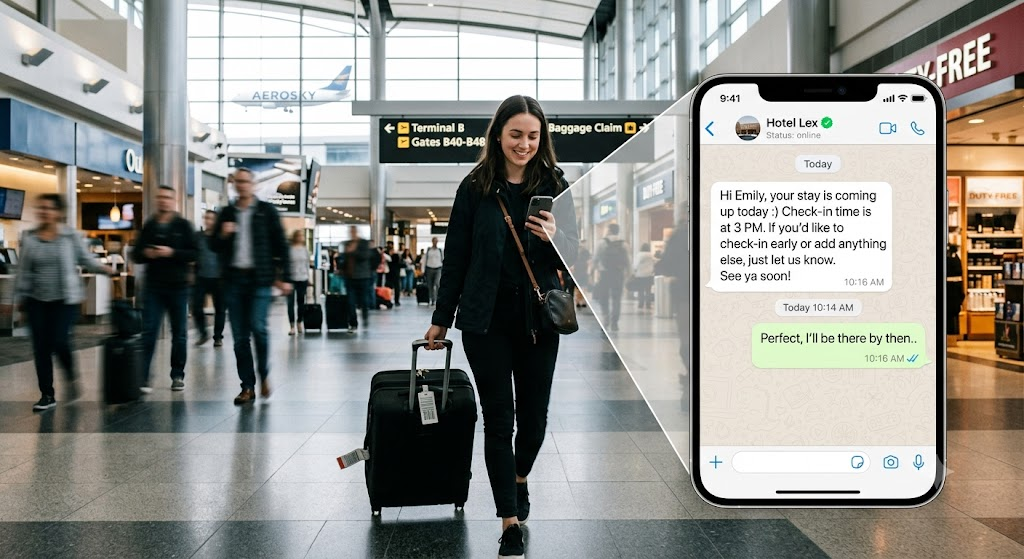
Online check-in completion rates live or die on whether the reminder actually reaches the guest in time. One boutique property in Los Angeles moved its check-in reminders from email to WhatsApp after finding email simply wasn't landing before arrival, the completion rates rose sharply to 78%+ once the same message went out on WhatsApp instead.
"Hi James, your stay is coming up tomorrow:) Save time at the front desk! Complete your online check-in here before your arrival: [link]. Takes 2 minutes. Meanwhile, if you need anything just let us know.”
“Hi James, we're looking forward to welcoming you to Lex Resort on [check-in date]! To help us tailor your stay, we'd love for you to share a few preferences before you arrive — things like room setup, dining, spa interests, or any special occasions we should know about.
It only takes 2–3 minutes: [Questionnaire Link].
If you could complete it by [deadline date], our team will have everything ready for your arrival. If you have any questions in the meantime, feel free to reply to this message.
See you soon!”
Message category: Utility · Right Time: 48 hours before arrival
3. The Pre-Arrival Upsell
Post-booking, pre-arrival upsell campaigns, early check-in, room upgrades, breakfast packages — sent on WhatsApp convert dramatically better than the same offer sent by email, since the guest is already planning the trip and reading the message in real time. Aim is to keep the message high-value and holistically embed them as part of the guest journey. Here’s an example:
"Hi Amy, your stay is coming up tomorrow :) Check-in time is 3 PM.
If you need anything, just let us know — and if you'd like an early check-in, a room change, or want to add anything else to your stay, this link makes it easy: [Link]
See you soon!
The Lex Resort Team”
Message category: Marketing (requires opt-in) · Right Guest: booked, not yet arrived
Arrival Day: Get Guests Settled Fast
The first hour after a guest lands is when they're most likely to have a logistics question and least likely to want to make a phone call.
4. Directions & Arrival Logistics
A location pin, parking instructions, and a note on the fastest route from the airport — sent as rich media rather than a wall of text — heads off the single most common arrival-day question before it turns into a phone call to the front desk.
"Hello Mr Smith, We look forward to seeing you today. Let us know what time you may be arriving. Here's our location pin [map], and parking is in the garage on Elm St — just show this message at the gate."
Message category: Utility · Right Format: location pin + image
5. The Digital Check-In Link
For guests who didn't complete check-in ahead of time, a same-day nudge with the ID-upload and registration form link removes a front-desk bottleneck, especially useful for city-center properties with high same-day turnover.
"... Skip the line — finish check-in on your phone here: [link]. Your room will be ready when you are."
Message category: Utility · Right Guest: hasn't completed pre-check-in
6. The Arrival-Day Welcome + Concierge Page
Once a guest is checked in, a short welcome message linking to a personalized concierge micro-page- Digital guidebook — Wi-Fi details, restaurant hours, spa booking — replaces the printed in-room binder and gives guests a self-serve option any time of day.
"Welcome, Emma! Your room is 412. Everything you need — Wi-Fi, restaurant recommendations, spa booking — is here: [digital guidebook link]. Just message us if you need anything."
Message category: Service (inside 24-hour window) · Right Time: on check-in
In-Stay: Be There Without Being Intrusive
This is the stage where WhatsApp does something emails structurally can't: hold a real two-way conversation without feeling like a support ticket.
7. The "Is Everything Okay?" Check
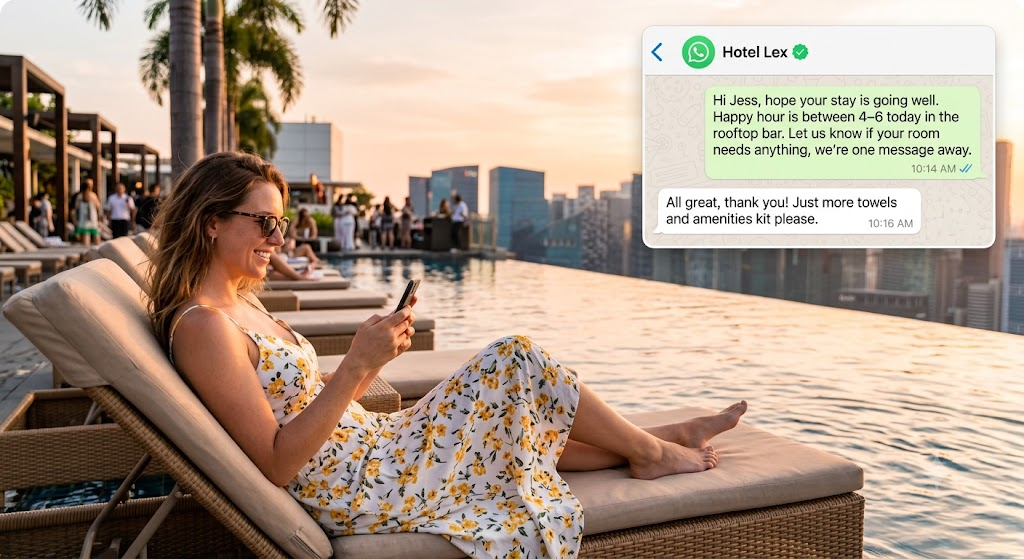
A short, automated wellbeing check sent a few minutes after check-in gives guests a natural opening to flag a problem immediately rather than waiting until checkout — or a public review — to mention it. One German property built this exact touchpoint specifically because it felt more instant and more human than any other channel available to them.
"Hi Lukas, hope your stay is going well. Happy hour is between 4-6 today in the roof top bar. Let us know if your room needs anything — we're one message away."
Message category: Service · Right Time: 10–15 minutes after check-in
8. On-Demand Concierge Requests
Letting guests text for towels, late-night questions, or restaurant recommendations — rather than calling the front desk — matches how guests increasingly prefer to ask: a majority now say they'd rather message a hotel than pick up the phone for exactly this kind of request.
Guest: "Can we get 2 extra towels to room 208?"Hotel: "On the way! Should arrive within 10 minutes."
Message category: Service · Right Channel: guest-initiated
9. Mid-Stay Service Recovery
A proactive mid-stay check — not just after check-in, but again around the midpoint of a multi-night stay — catches issues while there's still time to fix them, instead of finding out at checkout when it's too late to do anything but apologize.
"Hope you're enjoying your stay so far, Daniel! Anything we can improve before check-out?"
Message category: Service · Right Guest: multi-night stays only
10. On-Site Upsells for Slow-Moving Inventory
WhatsApp isn't only for big-ticket upgrades. Some properties use it specifically to move inventory that doesn't sell itself — a spa slot that's wide open, a late dinner reservation — sending a timely nudge instead of letting it go unsold for the night.
"Hello James, a quick note: last-minute spa opening at 6 PM tonight — with complementary glass of champagne. Additionally, here’s what’s happening around town tonight.”
Message category: Service, if sent inside an open window; Marketing otherwise
Checkout: Close the Loop Cleanly
Checkout is a two-message moment at most, the goal is to make it effortless, never to squeeze in one more pitch.
11. The Checkout Reminder & Late Checkout Offer
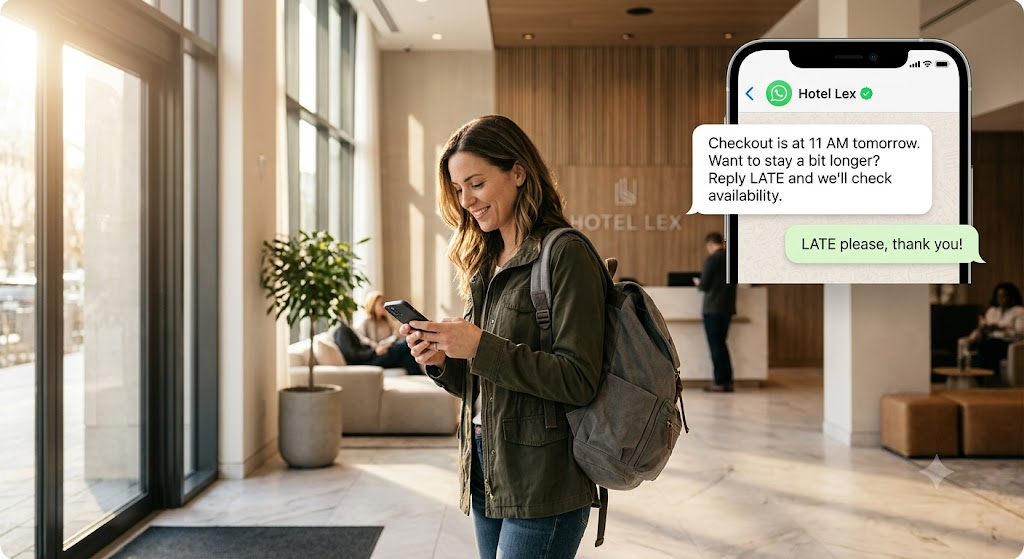
A simple reminder with a one-tap option to request late checkout (subject to availability) saves a phone call and gives the front desk advance notice instead of a surprise at 11:58 AM.
"Checkout is at 11 AM tomorrow. Let us know if you need any help with luggage or arranging a cab. Want to stay a bit longer? Reply LATE and we'll check availability."
Message category: Utility · Right Time: morning of departure
12. The Post-Checkout Thank You With NPS or Collect Reviews Instantly
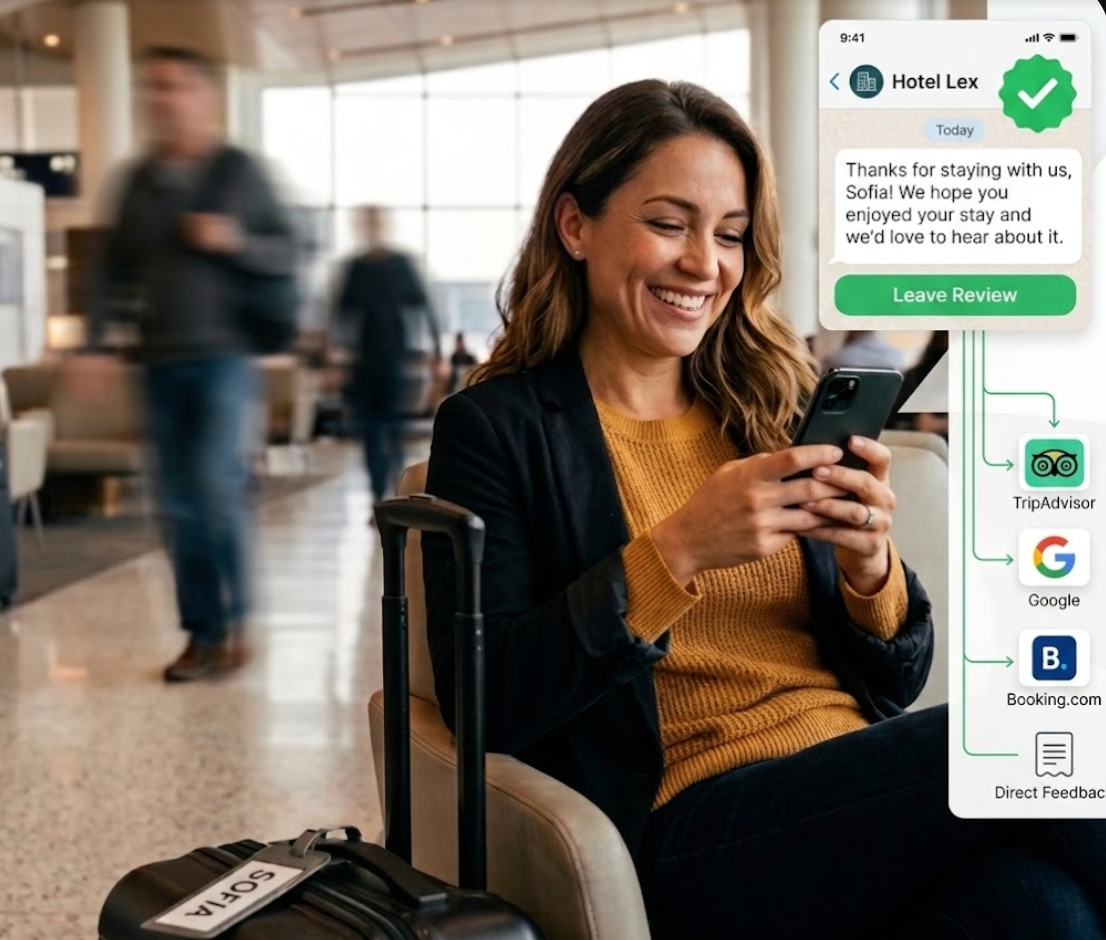
A short thank-you sent shortly after departure closes the stay on a genuine warm note.
GuestTouch's Reputation and Guest Feedback Platform lets you build the right survey for your goals and desired outcomes, NPS, star rating, custom questionnaire, or smart feedback, to optimize reviews on OTAs and review sites like Google, Tripadvisor, Booking.com, and Expedia.
You can easily personalize it with a dynamic link for each guest:
"Thanks for staying with us, Sofia! At Lex, each experience truly matters to us. We hope you enjoyed your stay and we’d love to hear about it {{GuestTouch Custom feedback link}}. Safe travels, we'd love to host you again."
Message category: Service · Right Time: within hours of checkout
Bringing It All Together
Start small: none of these 12 use cases need to launch at once.
Most hotels get the most value by starting with three, usually the pre-arrival check-in nudge, the post-check-in wellbeing message, and the review request — then adding the rest of the journey holistically only if they provide high value or satisfaction to your guests.
The common thread across all 12 is the Adaptive Messaging Model: the right message, to the right guest, at the right time, in the right format, on the right channel.
That's the layer GuestTouch handles by default, WhatsApp, SMS, email OTAs messaging built specifically for the hotel guest journey, connected to your PMS. WhatsApp onboarding, verification and template management for WhatApp - all handled for you. Once in place, you can create your own unique guest journey and adapt as you see fit.
Lastly, before you design any message, run it through the LESS Filter: Lean, Earns its send, Succinct, Seen from their side. If a message doesn't clear all four, it's not ready to go.
The LESS Filter
L: Lean. Only send if it earns its place. Fewer, better messages beat a steady drip.
E: Earns Its Send. Ask: does this actually help the guest, or just help us? If it's not useful to them, hold it.
S: Succinct. Say it in the fewest words that still land. If it needs three paragraphs, it's a guidebook link, not a message.
S: Seen From Guests’ Side. Written from the guest's perspective, not the property's calendar of what it wants to promote/say.
Ready to put these use cases to work at your property? Book a free demo and we'll show you how it fits your guest journey.


Need Help ?
Talk to our Experts to supercharge your Pre-Arrival experience
Schedule Now
Posted on
July 16, 2026
Referenced GuestTouch Products
No items found.
AI generated responses for your reviews
Powered by Review Response AI

Similar Articles
Get bright ideas and best practices delivered straight to your inbox
Stay up to date! Get all the latest & greatest posts delivered straight to your inbox
Don’t worry we won’t send you spam