


The Boutique Hotelier's Guide to Smarter Guest Messaging: Room-Specific Messages, MMS, Scheduled Broadcasts & More

Reputation Management
All Your Reviews In One Place
Track Reviews & Feedback, Collect More Reviews, Prevent Poor Reviews, Guest Feedback, Analytics & Reporting, Respond to Reviews with guestAI or with our Dedicated Team, Reviews Widget for Website, PMS Automations and more.
Book a Quick 15-minute Call for a Customized Setup. We personalize your trial by understanding your brand's unique goals during a quick call.
Guest Messaging Platform
Transform Guest Communication & Revenue with an All-in-One Platform
Seamless Guest Communication and Engagement: From Pre-arrival to Check-out
Book a Quick 15-minute Call for a Customized Setup. We personalize your trial by understanding your brand's unique goals during a quick call.
Review Responses
Done For You
Handcrafted, Personalized Responses to Your Online Reviews. Done for You.
Book a Quick 15-minute Call for a Customized Setup. We personalize your trial by understanding your brand's unique goals during a quick call.
Request Free Trial
Book a Quick 15-minute call
We personalize your trial by understanding your brand's unique goals during a quick call.
You run a boutique property. Every room has its own story — the corner suite with the clawfoot tub, the garden cottage that needs its own check-in instructions, the loft with the rooftop access code. Your guests chose you precisely because you are not a cookie-cutter chain.
So why is your guest messaging treating everyone the same?
Most independent hoteliers who get started with guest messaging start the same way: one welcome message, one pre-arrival reminder, sent to everyone. It works — and it's already a big step up from phone calls and front-desk chaos. But once you've got the basics running, the next question is always: how do I make this feel more like us?
This guide is the answer. We'll walk through four messaging capabilities that boutique and independent properties use to go from "we send messages" to "our messaging feels like an extension of our hospitality": room-specific personalization, MMS image messaging, scheduled broadcasts, and audience-targeted campaigns. Each one is practical, set-it-and-forget-it, and built for teams that don't have a dedicated marketing department.
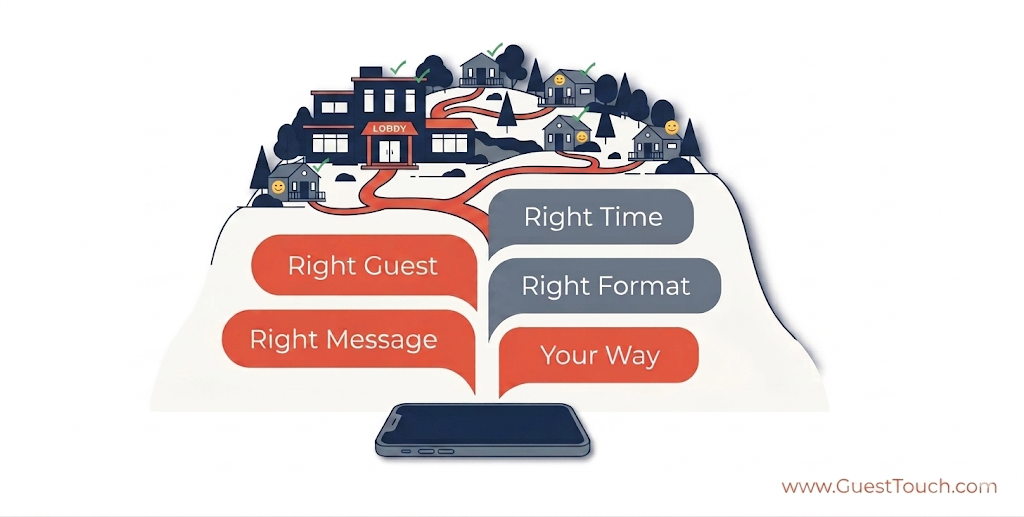
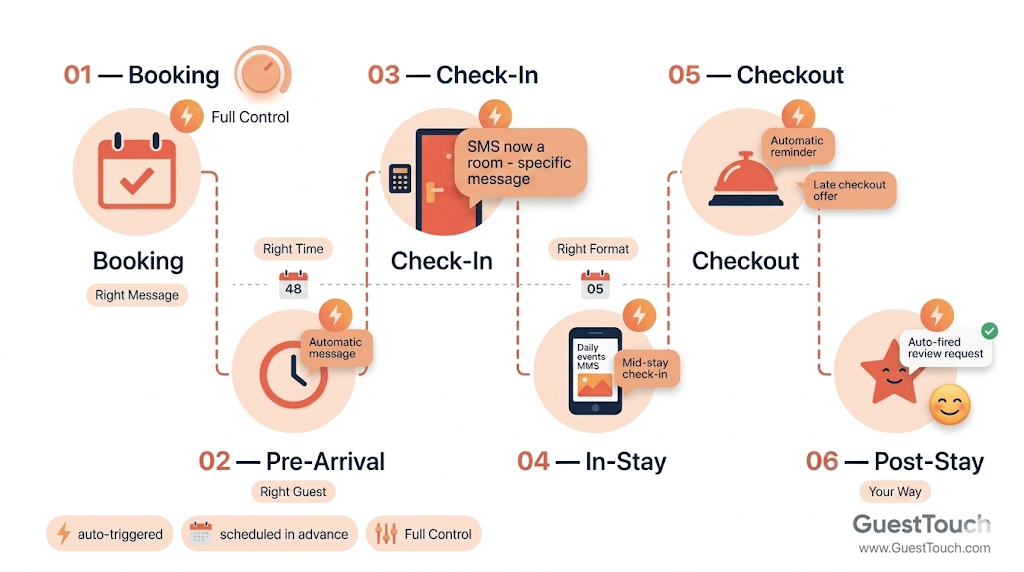
At GuestTouch, we call this the Adaptive Boutique Messaging Model — and it comes down to five things: Right Message. Right Guest. Right Time. Right Format. Your Way.
- Right Message — content specific to the room, room type, or unit
- Right Guest — one guest, a segment, or everyone in-house
- Right Time — triggered by your PMS or scheduled weeks ahead
- Right Format — text, MMS with images, or broadcast
- Your Way — set it up your way!
1. Right Message: Room-Specific & Room-Type Messages, Stop Sending the Same Thing to Everyone
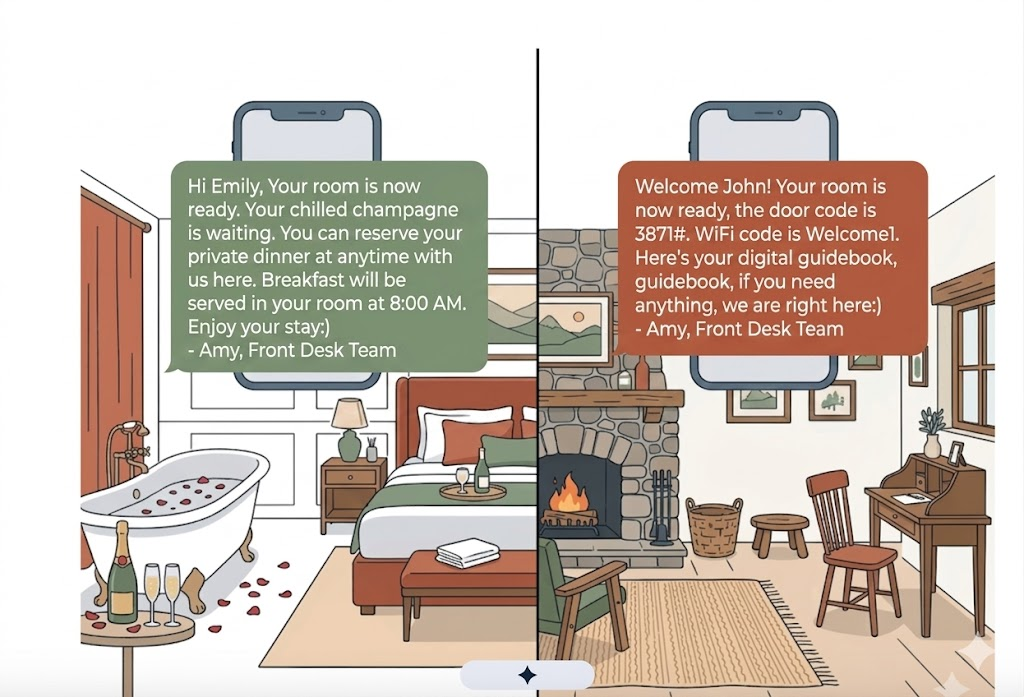
Right Message means your guest in the garden cabin gets completely different information than your guest in the main building suite — automatically, from the moment they book
Here's a scenario that plays out at independent properties every day: A couple books your honeymoon suite. A solo business traveler takes the standard king. A family of four gets the connecting rooms. They all receive the same welcome message — maybe a warm one, but still entirely generic.
Or consider a property that's spread out across a large area — individual cabins, glamping tents, or tiny homes dotted across a forest or hillside. A guest arriving after dark to find their way to "Cabin 7" or "The Pepperberry" needs very different information than a guest checking into a main-building room: their specific parking bay, the walking track to their unit, a door code, and maybe a heads-up that their wood-burning fireplace takes 10 minutes to draw. A generic arrival message doesn't just miss an opportunity — it actively leaves guests stranded.
Room-specific messaging fixes both problems. By connecting your messaging platform to your PMS, you can trigger different message content based on the room number or room category a guest is booked into. This is not complex to set up, and the impact on the guest experience is immediate.
GuestTouch supports room-specific messaging natively. Simply connect your PMS, build your message variants once, and the platform automatically sends the right message based on the guest's room number or room type at the appropriate stage of their journey.
Messages are also automatically delivered through the most suitable channel—whether SMS or WhatsApp—so there's no need for manual intervention. Based on your predefined rules, GuestTouch automatically routes each message through the right medium to ensure it reaches the guest effectively.
What room-specific messages look like in practice
- Spread-out properties — cabins, tiny homes, glamping: When units are scattered across a large area, each guest needs their own navigation instructions. Which car park to use, the walking track to their specific unit, the keypad code, what to do if the path is unlit at night. One generic message simply cannot serve a guest arriving to "Dogwood Hillside" the same way as one arriving to "Blackjack Deluxe" — they are in different locations, accessed differently, with different features to switch on.
- Different room types with unique attributes: Send a personalized welcome that mentions champagne on arrival, a spa menu link, and turn-down service opt-in — none of which applies to a standard room.
- Accessible rooms: Include specific instructions about elevator access, grab-bar locations, and staff contact for any accessibility needs. Guests who need this information find it before they even have to ask.
- Cottage or detached unit: Give guests their specific key code, parking pad assignment, and instructions for the wood-burning stove — details that would be irrelevant noise to guests in the main building.
- Pet-friendly rooms: Remind guests where the dog-walking trail starts, where the outdoor shower is, and what the pet policy is for common areas.
- Rooms with known quirks: Room 7 has a tricky lock? The third-floor shower takes 60 seconds to heat? Put it in the message. You preempt the complaint before it becomes a review.
Sample room-specific arrival message — dispersed cabin property:"Hi [First Name], welcome! Your cabin, The Pepperberry, is ready for you. A few things to help you settle in:→ Park in Bay 3 at the main gate (your name is on the sign).→ Follow the red trail markers from the carpark — about 4 minutes on foot.→ Your door code is 4821. The fireplace takes about 10 minutes to draw; we've left a starter kit on the hearth.→ The outdoor bath is filled and at temperature. Towels are in the wicker basket on the deck.Text us here anytime — we're on until 10 PM and happy to help."
Notice what this message does: it gives the guest everything they need to arrive confidently — parking, wayfinding, access code, and two features specific to that cabin. None of it would make sense for a guest in a different unit. That's the point. A generic welcome can be warm; a room-specific one is actually useful. And for spread-out properties especially, useful often matters more than warm.
2. Right Format: MMS & Image Messaging: Show, Don't Just Tell
Text messaging has a limitation that anyone in hospitality feels intuitively: sometimes words aren't enough. Describing your farm-to-table breakfast menu is fine. Sending a photograph of it is a reservation.
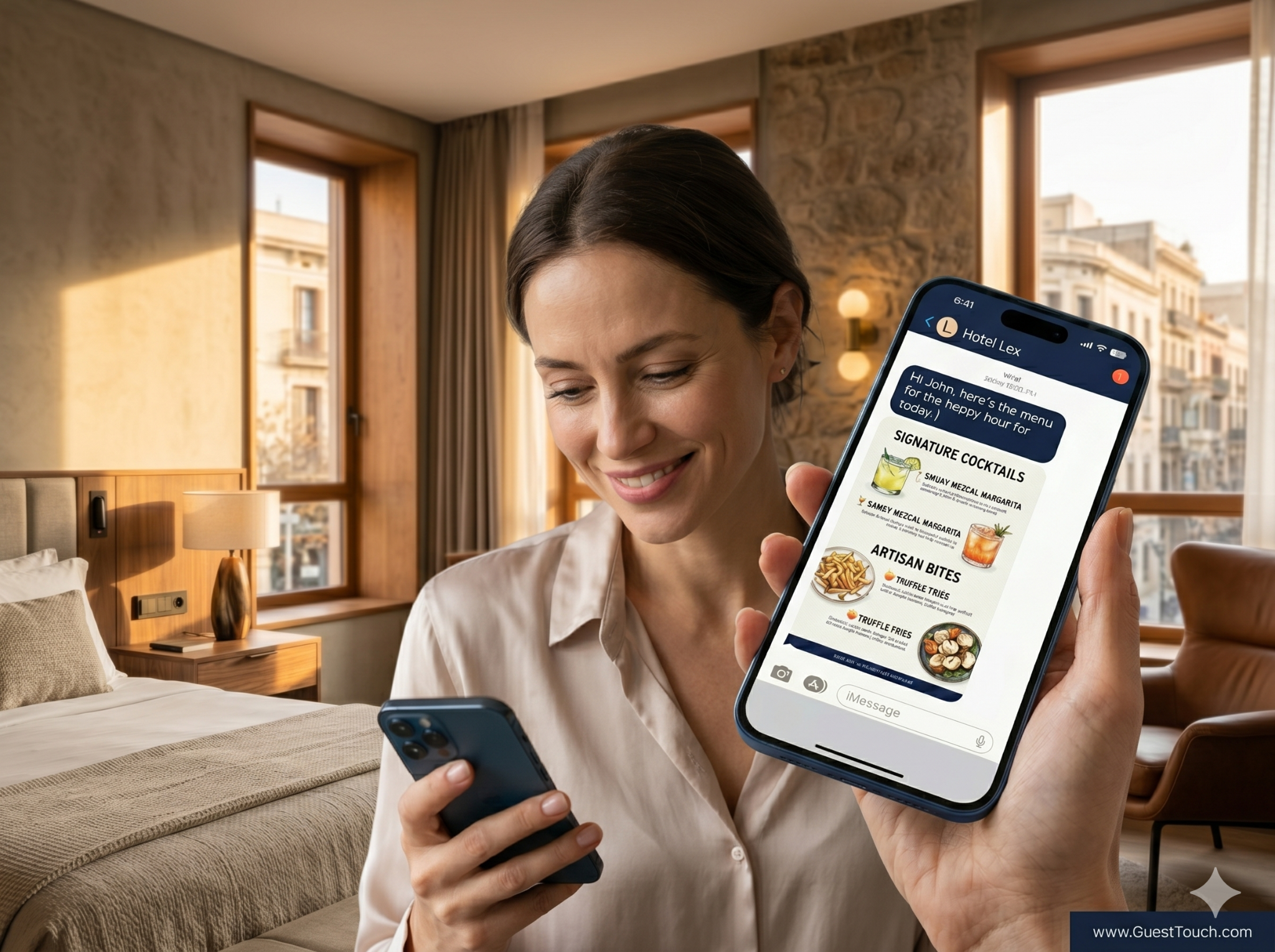
MMS (Multimedia Messaging Service) lets you attach an image to a text message — no app required, no link to click. It lands in the same SMS thread your guest is already reading.
GuestTouch supports MMS messaging, so you can attach photos, menus, and visual guides directly to any message in the guest journey — no third-party tool required.
Where MMS earns its place in the guest journey
- Pre-arrival upsells: A photo of your upgraded room category, your spa treatment menu, or a dinner special can convert an upsell offer that a plain text message cannot.
- Property orientation: Send a visual map of the property at check-in — especially valuable for multi-building boutique resorts where guests get disoriented.
- Food & beverage promotions: A well-shot photo of tonight's chef special sent to all in-house guests at 4 PM is the digital equivalent of a table tent — and far more likely to be seen.
- Local recommendations: Share a custom visual guide to the neighborhood: your top three coffee spots, the farmers market map, the hiking trail photo. This is the kind of thing guests screenshot and share.
- Weather or event alerts: A storm advisory, a local festival map, or a last-minute activity option with a photo lands better than a wall of text.
Sample MMS broadcast: "Good morning [First Name]! Here's what's on today at The Harborside: Live acoustic set: 7 PM. Today's dinner menu is attached — the chef's changing it daily so tonight's is worth it. Text us here if you'd like a dinner table held. Enjoy your day!" [Attach: todays_menu_and_events.jpg]
A few practical notes on MMS: images should be under 1MB for reliable delivery across carriers, and horizontal (landscape) images display better in most SMS threads. Your messaging platform will handle delivery across carriers automatically — you just upload the image and write the copy.
3.Right Time: Scheduling Messages in Advance: Set It Up Once, Deliver It Perfectly Every Time
The front desk at a boutique hotel is rarely staffed by someone whose primary job is sending messages. It's the same person checking guests in, answering the phone, fielding requests, and managing the team. Manual messaging — even with the best intentions — gets forgotten, delayed, or inconsistent.
With GuestTouch, message scheduling solves this entirely. You write the message once, set the delivery trigger or timestamp, and it goes out automatically — whether you're at the desk, in a team meeting, or closed for the night.
Two types of scheduling boutique hotels rely on most
Trigger-based scheduling (tied to the reservation): These fire automatically based on an event in your PMS — X hours before arrival, Y hours after check-in, Z hours before checkout. Once you build the workflow, every guest gets the right message at the right moment with zero manual effort.
Calendar-based scheduling (tied to a date): These are one-time or recurring sends you prepare in advance — a Valentine's Day dinner promotion, a summer activity guide, a New Year's rate announcement. You write it in January, schedule it for February 10th, and it's done.
GuestTouch lets you build both types of scheduling inside the same platform — trigger-based sequences tied to your PMS reservation data, and calendar-based broadcasts you write and queue in advance.
Practical scheduling sequences for boutique properties
- T-48 hours before arrival: Confirmation reminder with check-in time, parking details, and a room-specific link to your digital welcome guide.
- T-2 hours before check-in: "Your room is being prepared" message — sets expectations and reduces front-desk arrival calls.
- Day 1 in-stay (morning): Breakfast hours, day's activity recommendations, or a check-in from the manager.
- Day 2 in-stay (mid-stay): Quiet satisfaction check — "How's your stay going? Anything we can make better?" Catches issues while there's still time to fix them.
- T-12 hours before checkout: Checkout time reminder, late checkout offer, and any settle-up instructions.
- T+2 hours after checkout: Review request, with a warm closing message from the property.
Pro tip: Map your full message sequence on paper first — from booking confirmation through post-stay — before you build it in your platform. Seeing the whole arc at once helps you spot gaps, redundancies, and the moments where a room-specific or MMS message would add the most value.
The operational payoff here is significant. Independent hotel operators who implement full messaging sequences consistently report reduced inbound calls about check-in logistics, fewer mid-stay complaints that escalate to reviews, and better review volume post-stay — simply because the review request arrives at the right moment without anyone having to remember to send it.
4. Right Guest: Broadcast Messaging: Reach All Your Guests at Once
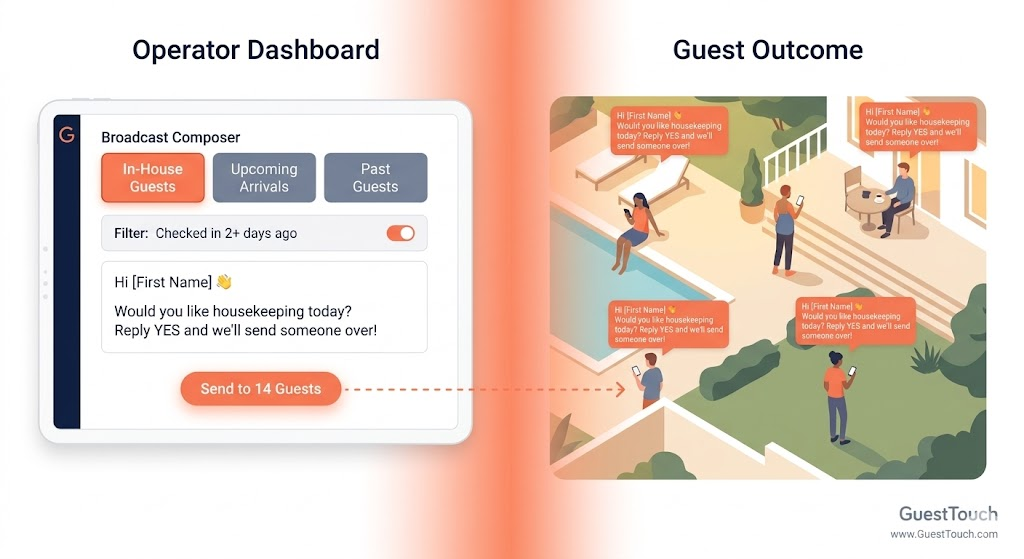
Sometimes you need to talk to everyone — not just individual guests as they move through their journey, but your entire in-house population right now. Broadcast messaging lets you do exactly that.
Think of a broadcast as a targeted group text: you define the audience (all current guests, all arrivals this weekend, all guests in a specific date window), write your message, and send. Every guest in that segment gets it, personalized with their name and other PMS-pulled variables.
GuestTouch's broadcast feature lets you define that audience by stay date, arrival window, or current in-house guests — and send to all of them in one action, with personalization tokens pulling from your PMS automatically.
When boutique properties reach for broadcast
- Unexpected property news: Pool closed for emergency maintenance? The restaurant is fully booked tonight? A water interruption for two hours? A broadcast gets everyone informed in under two minutes, without running door-to-door.
- Local event heads-up: A street fair, a farmers market, a major sports event — guests love knowing what's happening nearby, especially when it comes from the property. It reads as local expertise, not marketing.
- Happy Hour: A last-minute spa opening, two seats at tonight's wine dinner, a surprise happy hour for in-house guests. Scarcity + immediacy = conversions that email can't match.
- Weather alerts: A severe weather advisory, a wildfire smoke warning, or a heat wave recommendation (stay hydrated, pool hours extended) shows guests that the property is looking out for them.
Sample broadcast — happy hour: "Hi [First Name] — it's Friday! Happy hour runs 4:30–6:30 PM tonight. Here's our signature cocktail menu 🍹 Hope you can join us."
The Adaptive Boutique Messaging Model at a Glance
Here's how the four features work together across your guest journey:
Getting Started: How to Think About Rolling This Out
If you're just getting started with GuestTouch or any guest messaging platform, don't try to build all of this at once. The sequence that works best for most independent properties:
- Start with your foundational automated sequence — pre-arrival, check-in, mid-stay, checkout, post-stay review request. Get these running cleanly first.
- Add room-type personalization to your welcome message. Pick your two or three most distinct room categories and write tailored versions. This is usually the highest-impact change for the least effort.
- Test one MMS message — your best food photo, a property map, or a visual upsell offer. See how guests respond. Most properties are surprised by how much engagement a single well-timed image generates.
- Schedule your next seasonal broadcast in advance — a summer activity guide, a holiday promotion, or a local event alert. Build the habit of writing and scheduling content ahead of time so it never gets forgotten.
The Advantage Independent Hotels Actually Have
Large hotel chains have rigid infrastructure. What they don't have is flexibility and agility — the ability to send a message that sounds like it came from a person who knows the property, the room, and the guest standing in it. That's your advantage.
Room-specific messaging, MMS, scheduled broadcasts, and targeted campaigns don't require a marketing team or a large budget. They require the right platform and an hour or two of thoughtful setup. Once they're running, they deliver the kind of hospitality experience that guests mention in reviews — the property that seemed to know what they needed before they asked.
That reputation and results compound over time. And it starts with the right message going to the right guest at the right moment.
The Adaptive Boutique Messaging isn't a feature list. It's the operating principle behind how GuestTouch is built — so that independent properties can deliver micro-moment contextual messaging that is handcrafted to every guest, without anyone on your team manually sending a single message. Right Message. Right Guest. Right Time. Right Format. Your Way.
Ready to set up room-specific messages, MMS, and scheduled broadcasts for your property? Book a quick 15-minute call with GuestTouch — we'll walk you through a setup personalized to your property.


Need Help ?
Talk to our Experts to supercharge your Pre-Arrival experience
Schedule Now
Posted on
May 27, 2026
Referenced GuestTouch Products
No items found.
AI generated responses for your reviews
Powered by Review Response AI

Similar Articles
Get bright ideas and best practices delivered straight to your inbox
Stay up to date! Get all the latest & greatest posts delivered straight to your inbox
Don’t worry we won’t send you spam